Never knew how to add an email subscription on blog till I found this. Blogger's tutorial wasn't that good but this one totally was below. EnJOY!
You might have seen lots of blogs are using email subscription option to their readers. It can happen that your friend using feedburner email subscription widget to his/her blog, and you are looking for a help to add email subscription option to your blog.
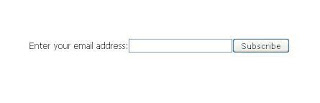
I'm guiding you about adding an email subscription widget to your blog from feed burner. These are easy steps to follow.
1) First of all and before anything, you'll need a FeedBurner account. To create an account, just click here. If you have already google account, that case it will be easier for you. Otherwise you can use other email address to open an account from FeedBurner.
2) If you are a new FeedBurner user, you'll need to burn your feed first.
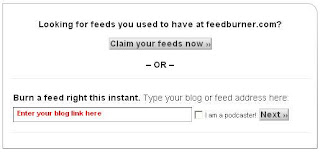
3) Now you have burned a feed for your blog. Usually you'll not require to follow this step. It will automatically take you to step 4. But still if not, that case just click on your feed title, it will look like as below image.
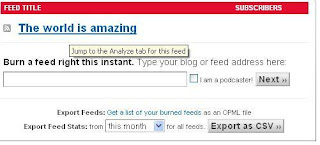
4) Now click on the publicize link from your feed burner dashboard.

5) From the left side of the page, you'll find a link "Email Subscriptions", click on that.
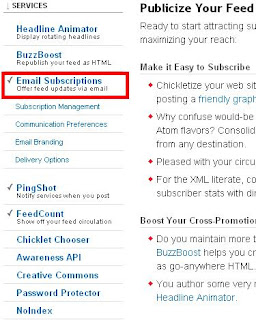
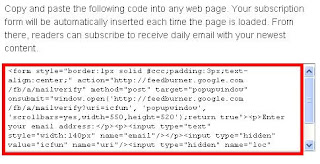
6) Now you'll see a piece of code like below. Just copy the code, and place at your blog. You can even select your blog type like (Typepad, wordpress, blogger) and it will automatically take to widget option for corresponding blogs system.
You have the email subscription widget to your blog now. From your feed burner dashboard, you can change the email preference, email from address, and many more option, which is located just under the "Email Subscriptions" link.

I'm guiding you about adding an email subscription widget to your blog from feed burner. These are easy steps to follow.
1) First of all and before anything, you'll need a FeedBurner account. To create an account, just click here. If you have already google account, that case it will be easier for you. Otherwise you can use other email address to open an account from FeedBurner.
2) If you are a new FeedBurner user, you'll need to burn your feed first.

3) Now you have burned a feed for your blog. Usually you'll not require to follow this step. It will automatically take you to step 4. But still if not, that case just click on your feed title, it will look like as below image.

4) Now click on the publicize link from your feed burner dashboard.

5) From the left side of the page, you'll find a link "Email Subscriptions", click on that.

6) Now you'll see a piece of code like below. Just copy the code, and place at your blog. You can even select your blog type like (Typepad, wordpress, blogger) and it will automatically take to widget option for corresponding blogs system.

You have the email subscription widget to your blog now. From your feed burner dashboard, you can change the email preference, email from address, and many more option, which is located just under the "Email Subscriptions" link.


